

In the modern digital workplace, the "context-switching tax" is a very real, very expensive phenomenon. Every time a professional toggles between a Zoom call, an Excel spreadsheet, and a Chrome-based project management tool, they are forced to mentally recalibrate—not just their focus, but their entire interface navigation. Among the most frustrating remnants of this friction is the lack of standardized hotkeys. While one meeting app uses Cmd+Shift+A to mute your microphone, another might use Cmd+D, and a third might force you to hunt for an on-screen icon with your cursor while you’re mid-sentence.
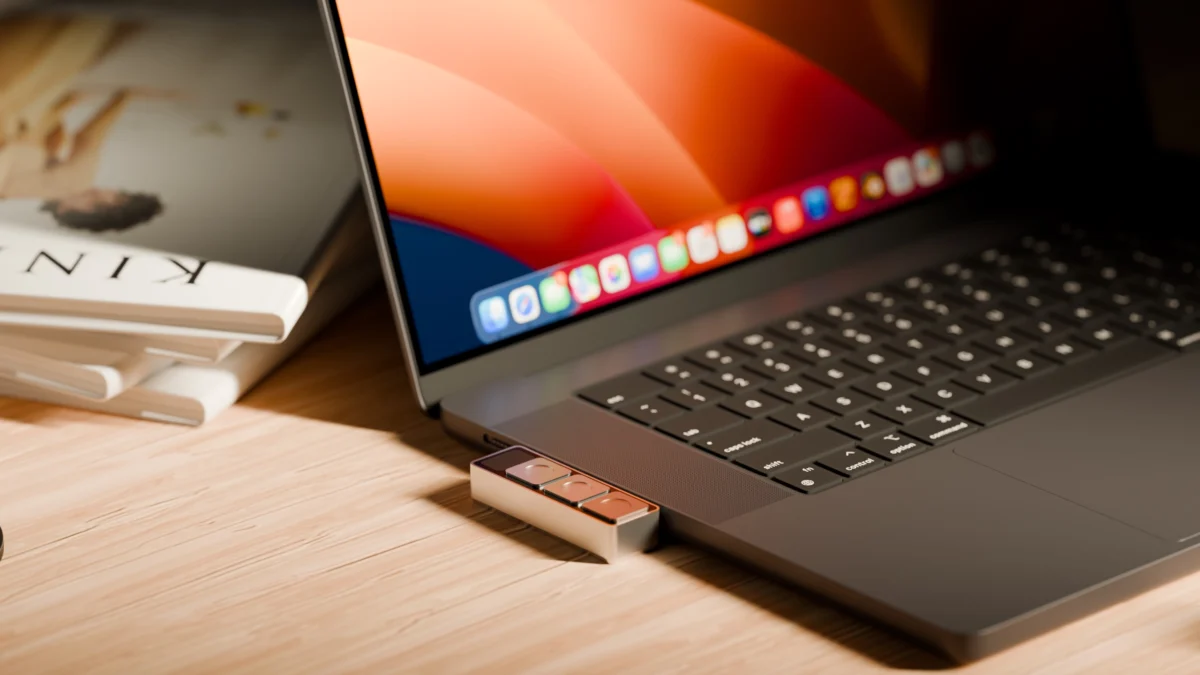
Enter Dune, a novel hardware solution from startup Project Mirage. Dune is a sleek, aluminum-clad, three-key keypad roughly the size of a stick of gum. By plugging directly into a MacBook’s USB-C port, it promises to eliminate the friction of modern digital multitasking by providing a physical, context-aware command center that evolves based on the application currently in focus.
Main Facts: A Physical Bridge Between Mind and Machine
At its core, Dune is a hardware interface designed to simplify the "last mile" of computer interaction. Retailing at $119—with an eventual price point of $149—the device is custom-built to sit flush against specific MacBook models, creating an aesthetic that feels more like an integrated peripheral than an add-on.
The device operates on a simple premise: three tactile buttons, infinite possibilities. Because the device is software-aware, its function changes dynamically.
- In Conferencing Apps: The keys can toggle your microphone, kill your camera, or bring the meeting window to the foreground.
- In Spreadsheets: The same keys shift roles to handle copy, paste, and undo functions.
- In Browsers: They can refresh pages, jump to the URL bar, or trigger AI-driven research scripts.
The device is powered entirely through the USB-C connection, meaning no batteries or external chargers are required. It is currently compatible with M2 Air or later, and M1 Pro or later MacBook models running macOS 15 Sequoia or newer.
Chronology: From Concept to Desk
The development of Dune follows a growing trend in the "prosumer" hardware market, where manufacturers are increasingly looking to bridge the gap between heavy-duty macro pads (like the Elgato Stream Deck) and the minimalist aesthetic of modern laptops.
- Design Phase: Project Mirage focused heavily on the physical form factor. By opting for a custom-milled aluminum chassis, they ensured the device would not be an eyesore on a premium Apple device.
- Software Integration: The team recognized that hardware is only as good as its companion app. They built a proprietary software suite that allows users to map keys not just to static shortcuts, but to dynamic macros and system-wide commands.
- The AI Pivot: Recognizing that manual macro configuration is a barrier to entry, the startup integrated Claude Desktop. This allows users to describe their desired workflow in plain English—"I want a button that summarizes this webpage"—and have the AI handle the underlying scripting.
- Market Entry: The product is now in the hands of early adopters, with the company focusing on a marketplace-driven growth strategy where users share custom "skills" for others to download.
Supporting Data and Technical Nuance
The efficacy of Dune lies in its integration with the macOS ecosystem. Users are not limited to simple key-binding. Through the companion app, users can leverage Python scripting for advanced automation.
The "Claude" Advantage
For users who aren’t programmers, the Claude integration is the device’s "killer app." During testing, the ability to build a shortcut that scans a company’s website, identifies its investors, and summarizes its competitors in real-time proved to be a game-changer for high-frequency knowledge workers. While the initial setup requires some back-and-forth debugging, the ability to iterate on your own custom productivity tools without writing a line of code marks a significant shift in how hardware-software interfaces are being designed.
Hardware Limitations
Despite its innovation, the device is not without its teething pains. Early feedback suggests that the keys possess insufficient resistance. In a professional environment, where a desk is often cluttered with beverages and notebooks, accidental presses are a real risk. Triggering an "unmute" command while reaching for a coffee mug is a privacy concern and a professional embarrassment that the designers will need to address in future iterations through higher-tension switches.
Official Stances and User Feedback
Project Mirage positions Dune as a "productivity-minded" tool, distinct from existing market incumbents.

- Versus MuteMe: Where the MuteMe device is a singular-purpose tool restricted to audio controls, Dune offers a broader range of macro capabilities.
- Versus Stream Deck: While the Elgato Stream Deck is a powerhouse for power users, it is bulky, requires a dedicated power source, and is often overkill for a nomadic office setup. Dune occupies the "ultra-portable" niche, prioritizing form factor and contextual intelligence over sheer button volume.
Project Mirage has indicated that they are actively monitoring the "Skills Marketplace." The company’s growth strategy hinges on the idea that the hardware is merely a "thin front end." The true value, they argue, is the community-driven ecosystem of shortcuts that will make the device more valuable the longer you own it.
The Implications of Context-Aware Hardware
The emergence of a device like Dune raises profound questions about the future of human-computer interaction. We are moving away from the era of static keyboards and toward an era of adaptive interfaces.
1. The Rise of the "AI-Native" Peripheral
Dune is part of a wave of devices that function as physical proxies for AI. By mapping LLM-powered tasks to a physical button, Project Mirage is essentially turning the MacBook into a semi-autonomous machine. When a user hits a button to "summarize this company," they aren’t just pressing a key; they are triggering a complex workflow of scraping, parsing, and summarizing.
2. The Standardization of Productivity
If tools like Dune become widespread, we may see a shift in how software developers build their apps. If hardware vendors can dictate the "universal" shortcuts for common actions, software companies might feel pressured to adhere to these standards, finally ending the nightmare of conflicting hotkeys across different conferencing platforms.
3. The Challenge of "Skill" Curation
The long-term viability of Project Mirage depends on their ability to curate the marketplace. Currently, there is no way to test a "skill" before committing it to a button. This creates a friction-filled user experience. To succeed, the company must provide a "sandbox" environment where users can preview how a skill functions, preventing the accidental assignment of inefficient or buggy commands.
Final Assessment: A Tool for the Modern Nomad
Dune is a compelling, if slightly imperfect, experiment in hardware design. For the consultant, the founder, or the developer who spends their day toggling between dozens of tabs and apps, the ability to outsource repetitive, context-sensitive tasks to a dedicated piece of aluminum is highly attractive.
However, the hardware needs to mature. The lack of key resistance is a fundamental ergonomic oversight that needs fixing. Furthermore, the reliance on a nascent marketplace means that, for the moment, the device is a "project" for the owner as much as it is a "tool."
If Project Mirage can iterate on the hardware—perhaps offering different key-switch resistances—and refine the software to allow for safer, more robust skill-testing, Dune could become as essential to the MacBook user as the trackpad itself. It represents a bold step toward a more fluid, less cluttered digital workspace, proving that sometimes, the most effective way to manage the complexity of modern software is to move it away from the screen and into the palm of your hand.
As we continue to navigate the complexities of remote work and digital multitasking, the "Dune" approach—where hardware proactively adapts to our digital intent—is likely to become the new benchmark for professional computing.
 Asep Darmawan
 Siti Muinah
 Ali Ikhwan
